Overview & Compatibility
Full Android Smartwatch Watchfaces and Clock Skins: A Detailed Overview
In the realm of wearable technology, full Android smartwatches have emerged as a popular choice for tech enthusiasts worldwide. One of the standout features of these devices is the ability to customize the watch face, also known as the “Clock Skin”. This article provides an in-depth look at full Android smartwatch watchfaces and clock skins.
Full Android Smartwatch Watchfaces
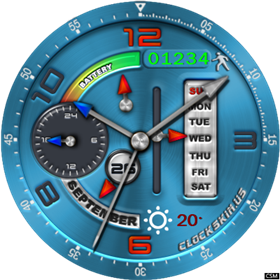
Watchfaces for full Android smartwatches are typically available in two formats: digital and analog. Digital watchfaces display time in a digital format and often include additional data. Analog watchfaces, on the other hand, mimic the look of traditional wristwatches with hour, minute, and second hands.
Key Features
- Optimized Battery Usage: High-efficiency black background design saves battery on AMOLED displays.
- Responsive Sensors: Smooth analog second hands and digital time sync with device clock.
- Full Resolution Support: Looks crisp on 400x400, 454x454, 360x360, and 320x320 round or square screens.
- Universal Compatibility: Works seamlessly with stock firmware and Universal Launcher.
Technical Specifications
| Compatible Brands | Lemfo, Kospet, Kingwear, Zeblaze, Lokmat, Microwear, Finow, Bakeey, Allcall, Diggro, No.1 |
|---|---|
| Supported OS | Android 5.1, Android 7.1, Android 8.1, Android 10, Wear OS |
| Screen Shapes | Round & Square Smartwatches |
| Recommended Launchers | Stock Watch Launcher, Universal Launcher, ClockSkin Transfer |
| File Name | 1555333778wpdm_Blueone.rar |
| Package Size | 1.23 MB |
| Antivirus Verification | ✅ 0/72 Detections (Clean) |
| License | Free for Personal Use |