Advertisement

clock skin watch faces for full android smart watches

📅 2018-05-31 12:42:15 📁 Digital ⭐ 4.9 (158 ratings) 📥 806 downloads 🛡️ Verified Safe
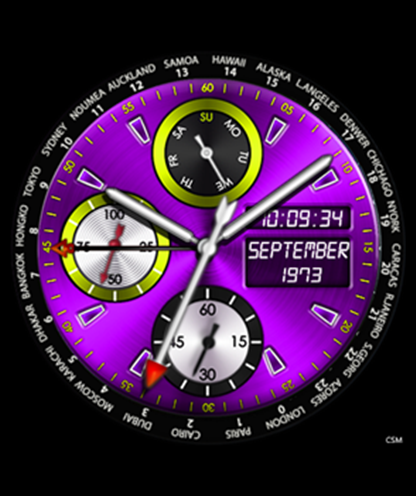
clock skin watch faces for full android smart watches Clock Skin Preview

Actual high-definition render as displayed on a 400x400 AMOLED smartwatch display.

Advertisement

Overview & Compatibility

clock skin watch faces ,Just extract download file in you PC and copy extracted file to your watch at “clockskin” folder, for more information and help please visit this page.

Clock Skin Watch Faces for Full Android Smart Watches

Smartwatches have become an integral part of our daily lives. They offer us the ability to stay connected, track fitness, and even the ability to pay from our wrist. However, one of the most impressive aspects of smartwatches is the ability to customize the watch face, or what is known as “Clock Skin”.

What are Clock Skin Watch Faces?

Key Features

  • Optimized Battery Usage: High-efficiency black background design saves battery on AMOLED displays.
  • Responsive Sensors: Smooth analog second hands and digital time sync with device clock.
  • Full Resolution Support: Looks crisp on 400x400, 454x454, 360x360, and 320x320 round or square screens.
  • Universal Compatibility: Works seamlessly with stock firmware and Universal Launcher.

Technical Specifications

Compatible Brands Universal Android, Lemfo, Kospet
Supported OS Android 5.1, Android 7.1, Android 8.1, Android 10, Wear OS
Screen Shapes Round & Square Smartwatches
Recommended Launchers Stock Watch Launcher, Universal Launcher, ClockSkin Transfer
File Name Ozon-Purple.rar
Package Size 735.5 KB
Antivirus Verification ✅ 0/72 Detections (Clean)
License Free for Personal Use
100% Safe & Clean Download • Verified by VirusTotal

Download clock skin watch faces for full android smart watches

📦 Format: RAR 💾 Size: 735.5 KB ⏱️ Instant Direct Server
🛡️ Initializing secure direct download link...
QR Code for clock skin watch faces for full android smart watches
📱 Scan to Open on Phone Point your smartphone camera at this QR code to open and download directly on your mobile device or smartwatch.
Advertisement

How to Install Clock Skin on Your Smartwatch

  1. Download and extract: Download the .zip or .rar file on your computer or phone. Extract the folder containing the watchface assets (images and clock_skin.xml).
  2. Connect your watch: Connect your Android smartwatch to your computer using the USB magnetic cable (choose "File Transfer" or "MTP" mode on watch).
  3. Copy to clockskin folder: Open the watch's internal storage and locate the folder named clockskin. (If it doesn't exist, simply create a new folder named exactly clockskin in the root directory).
  4. Paste folder: Paste the extracted folder inside the clockskin directory.
  5. Apply watch face: Disconnect the watch. Long-press on your watch's current watchface, swipe to the right or refresh the list, and tap your new clock skin to apply it!

For video tutorial and troubleshooting, visit our detailed Installation Guide.